
Hot on the heels of our 2.0.1 release, we are excited to introduce Admin Optimizer 2.1.0. This update isn’t just a patch; it introduces one of our most requested features: a built-in, high performance Form Builder.
Why a Form Builder?
Every website needs a contact form, and some may even require a more complicated form for registration, leads capture, etc. Yet, WordPress still doesn’t include a native form solution. Users often have to use third party plugins to be able to add forms to their pages. This also forces users into a frustrating dilemma:
- The Minimalists: Form plugins that are lightweight, but difficult to configure and work with.
- The Giants: Massive form plugins that slow down your site with upsells, heavy scripts and features you’ll never touch.
We built a third option.
Introducing our new Form Builder module
Our new Form Builder module is designed for the “80% use case.” It’s built directly into Admin Optimizer, meaning one less plugin to manage and a UI that feels like it actually belongs in your WordPress dashboard.
Instead of overwhelming users with hundreds of settings and unnecessary features, the Form Builder focuses on what most websites actually need:
- fast form creation
- clean frontend rendering
- reliable submissions
- spam protection
- entry management
- seamless WordPress integration.
Lightweight by design
Most form plugins become massive ecosystems with add-ons, upsells, analytics layers, and unnecessary scripts loaded on every page. Our Form Builder takes the opposite approach.
It is intentionally lean, modular, and performance-focused. Forms only load their assets when needed, submissions are handled efficiently through AJAX or standard POST requests, and the entire system is built to feel native to WordPress instead of bolted on.
Drag-and-drop builder that stays simple
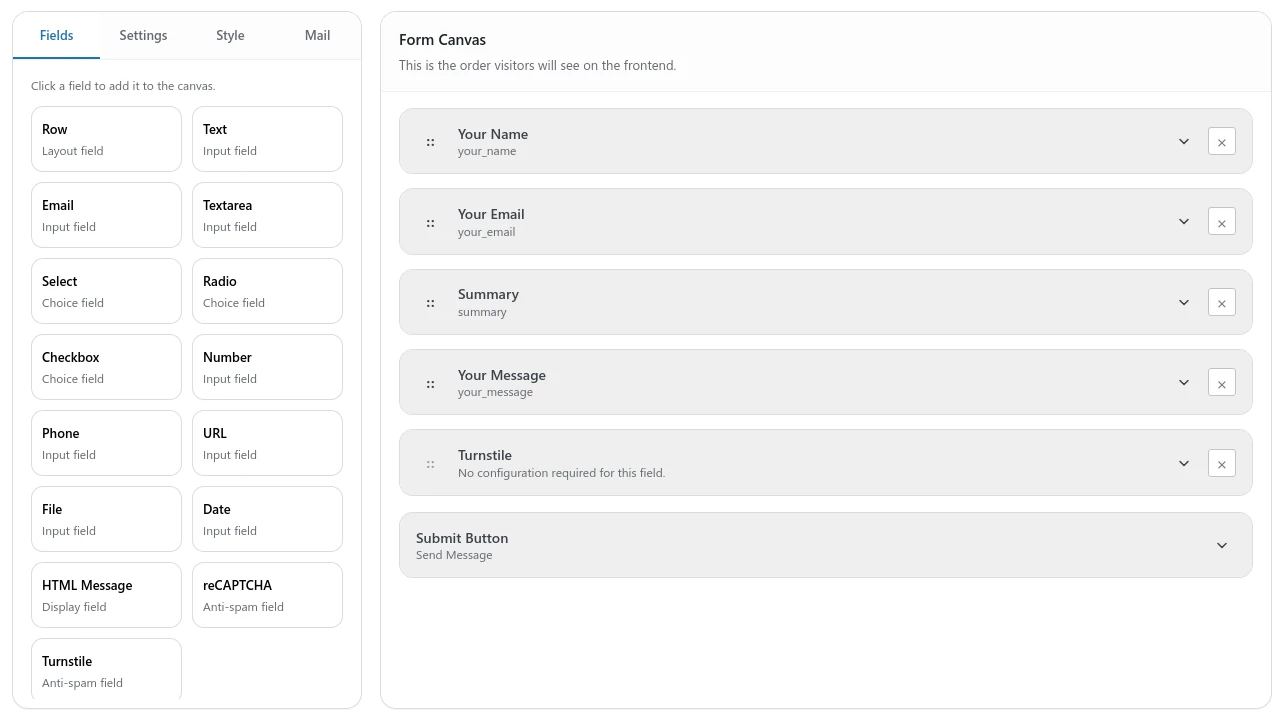
The builder provides a clean drag-and-drop interface with:
- Field bank
- Layout rows
- Nested row fields
- Inline field editing
- Form preview
- Style settings
- Mail settings
- Submit button customization
You can quickly build professional forms without dealing with complicated workflows or endless configuration screens.
Flexible layout system
Unlike many “simple” form plugins that force everything into a single vertical stack, we added a Row layout container that support multi-column form layouts.
You can now create side-by-side fields, responsive grouped layouts, and cleaner user experiences without custom CSS or external page builders.
Built-in spam protection
Spam protection is integrated directly into the module.
The Form Builder supports:
- Honeypot protection
- Google reCAPTCHA
- Cloudflare Turnstile
- Per-IP rate limiting
This gives users enterprise-level spam protection without needing extra anti-spam plugins.
Real entry management
Submissions are not just emailed and forgotten.
Entries are stored in a dedicated database table with:
- Entry listing
- Filtering
- Sorting
- Detailed entry views
- File handling
- Bulk deletion
- CSV export (Pro)
This makes the Form Builder useful not only for contact forms, but also for business workflows, lead collection, registrations, and internal operations.
Designed for the 80% use case
The goal is not to become an overly complex enterprise automation platform.
The goal is to cover the forms most websites actually need — quickly, reliably, and without plugin overload.
For many WordPress users, the Form Builder replaces the need for separate plugins like:
- WPForms Lite
- Fluent Forms Lite
- Contact Form 7
- Basic Gravity Forms setups
while staying dramatically lighter and easier to manage.
Pro Features That Matter
The Pro version focuses on genuinely useful upgrades instead of artificial limitations:
- Custom redirect URLs
- CSV exports
- Submission limits
- Role-based access control
- File upload restrictions
- Advanced email workflows
- Conditional logic roadmap*
- Webhook integrations roadmap*
- Frontend content submission roadmap*
The Form Builder is not just another form plugin — it is part of a larger effort to simplify WordPress administration while still delivering the features modern websites actually need.
You can get Admin Optimizer 2.1.0 for free, or get the Pro version for more powerful features.
