

Images aren’t just there to look pretty. They’re also valuable for SEO. Master image SEO and you instantly improve your site’s page loading speeds, accessibility, and even overall search engine rankings.
Images play a crucial role in a blog post. They break up text, making the content more visually digestible and stimulating. By adding relevant and visually captivating images, you can capture readers’ attention, convey information visually, and improve the overall readability of your posts. If you have not added any images to your content, make sure you update your content to include them, and use the following SEO tips when you are adding images.
Small Image Sizes Load Faster
While you want high quality images that look great on your site, you have to find the right balance of resolution and file size. The larger the file size, the longer it takes to load. Slow page loading speeds ruin the user experience, making users click away faster.
Ideally, try to keep the image file size less than 200KB. For larger sizes, try compressing the image before uploading. Many compression tools reduce the size without sacrificing any noticeable image quality.
As a general rule, stick with JPEG for photos and more complex images or PNG for anything requiring transparency. Or, use more modern image formats like WebP and AVIF that tend to balance quality along with performance.
Use the Right Image Dimensions
One of the simplest image SEO best practices is always use the proper image dimensions. This refers to the height and width in pixels, not the file size.
If you ignore the dimensions, you could just be wasting valuable bandwidth trying to load massive images into tiny areas. For example, uploading a 3,000 x 1,000 pixel image into a container on your WordPress site that’s just 700 x 500 pixels just causes more strain on your site.

Ideally, size images before uploading. And, make sure you always use responsive images that automatically resize based on the user device. By default, WordPress uses the srcset and sizes attributes for auto-resizing when using the Classic and Block editors. You can also add these manually if you’re using a custom editor. Responsive design is critical for making sure your content loads properly on all devices.
Optimize the File Name
Your visitors might not see the file name when scrolling through a post, but it does matter for image SEO. Think of your file name as a keyword or phrase. Search engines use file names to understand what your image is about.
Always use a descriptive name for your image file name. For example, an image of an orange on a table for a post about the benefits of orange juice might be “benefits-of-orange-juice-orange-on-table.jpg.“
Fill Out the Alt Text
It’s easy to skip over the Alt Text box when uploading images. After all, if you’ve named the image, why bother with more?
Alt text does far more for image SEO than you might think. It
- Further describes the image and purpose
- Gives search engines a deeper understanding of the image
- Improves accessibility for users who rely on screen readers
- Helps images rank better in Google Image searches
- Provides image context if the image fails to load for any reason
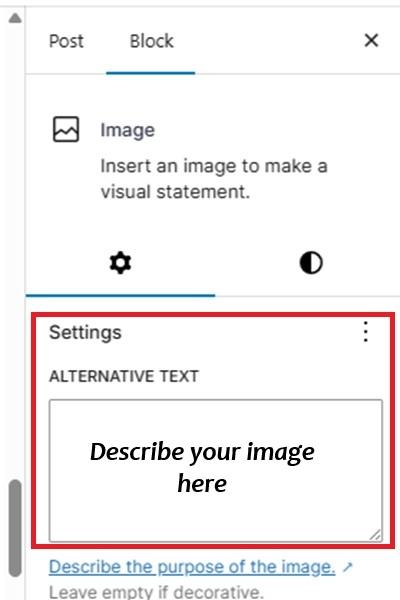
I know it’s tempting to just stuff the Alt text with keywords to boost your rank, but Google and other search engines don’t reward this strategy. Instead, focus on real descriptions. Think of how you would explain the image to a friend or co-worker.
For completely decorative images that don’t directly relate to the content, leave the Alt text empty.
Always Use Hyphens Instead of Underscores
Equally important is how you format the image name. Avoid blank spaces, symbols, and underscores (_). All of these confuse search engines and ruin SEO for your image. Instead, separate each word with a hyphen, such as “this-is-my-awesome-image.jpg.”
For example, while an image with the filename ‘awesome_image.jpg‘ appears to be the same as ‘awesome-image.jpg‘, Google (and other search engines) will remove the underscore (_) from the filename, and it becomes ‘awesomeimage.jpg’ which doesn’t make any sense.
Ideally, stick with the hyphen strategy in your URLs and slugs as well. The idea is to make everything easier for search engines to understand. Make their job easier and get rewarded with better rankings.
Make Optimizing Images Easier
Trying to remember to do everything to improve your image SEO gets tedious. Plus, it’s just too much pressure worrying if a single mistake, like using underscores versus hyphens, could hurt your site.
Our Admin Optimizer WordPress plugin includes several media management modules designed to make this process easier. These include:
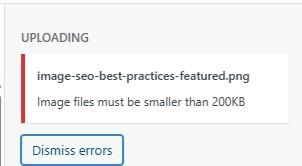
- Limit image upload file size – Set a max image file size for your site. If a user tries to upload a larger file size, it’ll be rejected along with a message as to the max size limit.
- Set image filename as Alt text – As discussed, images need alt text. But, if you forget to add it, this handy module autofills the alt text with your image’s file name. It’s not as perfect as writing out a description yourself, but it does ensure this box gets filled in.
- Convert underscore (_) in image filename to hyphen (-) – Since Google ignores underscores, this module automatically replaces any underscores with hyphens so Google correctly understands the image name.
Implement all three of these by going into the Admin Optimizer plugin on your dashboard and selecting Media Management. Turn on each module to enable them.
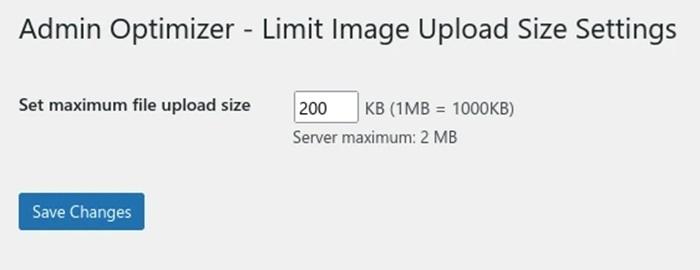
For the Limit image upload file size module, set the limit you want. This is measured in KB.
For the other two modules, you just have to turn them on for them work. No configuration needed.
Just remember, SEO includes your images. Optimize everything to give your site the best chance of reaching users organically.
