Take Complete Control of WordPress Email
Reliable email delivery, multiple SMTP providers, smart routing, direct sending, and developer-friendly APIs — all from one lightweight module.
The Problem
Why You Need SMTP on WordPress
By default, WordPress sends email through PHP’s built-in mail() function — and that’s a bigger problem than most site owners realize.
No sender authentication
PHP mail() doesn’t sign messages with SPF, DKIM, or DMARC — the checks receiving servers use to confirm an email is really from your domain.
Frequently marked as spam
Without authentication, password resets, order confirmations, and form notifications often land in spam — or get silently dropped.
Blocked by shared hosting
Many hosts throttle or disable PHP’s mail transport entirely to fight spam abuse — so messages can fail to send with no warning at all.
No visibility when it fails
There’s no delivery log or test tool — you usually only find out an email never arrived when a customer complains.
SMTP fixes this by sending your WordPress email through an authenticated provider — Gmail, Amazon SES, Mailgun, and others — so messages are signed, trusted, and trackable instead of relying on your server’s unverified mail transport.
Trusted Delivery
Replace Unreliable PHP Mail
Connect your preferred email provider in minutes — no more messages landing in spam or vanishing entirely.
Unlimited Profiles
One SMTP Profile Is Not Enough
Large sites often use different providers for different purposes. Email & SMTP lets you create unlimited SMTP profiles.
Smart Routing
Route Different Emails Through Different Providers
Set it once and every email type finds its own path — automatically, or through developer APIs.
Password Reset
Order Email
Newsletter
Contact Form
Admin Notice
Routing works automatically for known WordPress contexts, or explicitly through adminoptim_smtp_with_route() and adminoptim_smtp_with_profile() in your own code.
Direct Sending
Send Emails Without Leaving WordPress
Not just SMTP — a full composer built right into your dashboard.
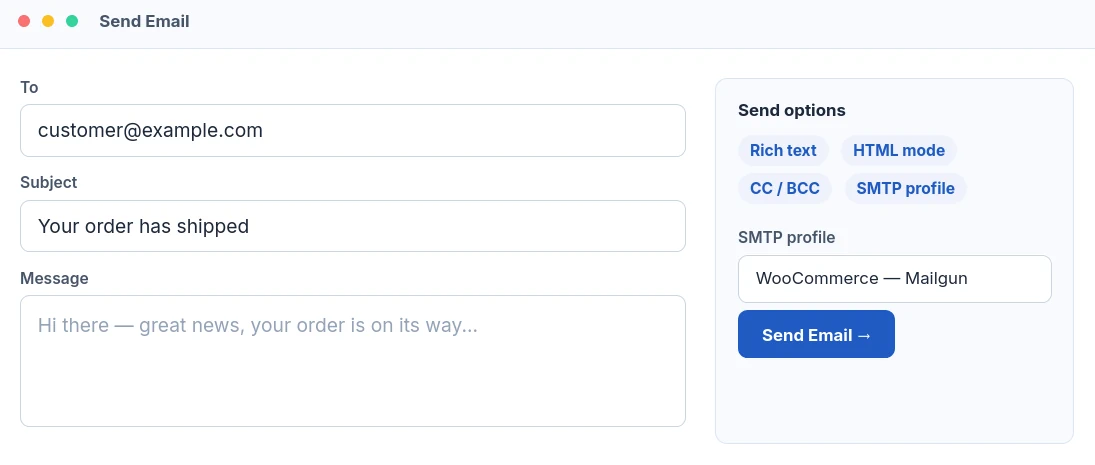
Not just for you — for every plugin on your site. This same composer isn’t a walled-off tool. A WooCommerce order screen, a Form Builder entry, or any other plugin can open it pre-filled with a recipient, subject, and message through one helper function, then hand control back when the email is sent. Developers who’d rather skip the UI entirely can call the direct-send API and fire an email straight from their own code.
// Open the composer, pre-filled, from any admin screen
echo adminoptim_email_compose_link( {
    'label'        => 'Email customer',
    'to'           => $customer_email,
    'subject'      => 'Order follow-up',
    'context_type' => 'woocommerce_order',
    'context_id'   => $order_id,
] );

// Or skip the UI and send directly from your own code
adminoptim_email_send( {
    'to'      => $customer_email,
    'subject' => 'Order follow-up',
    'message' => $message,
    'route'   => 'transactional',
] );Code language: PHP (php)Confidence Check
Test Before You Trust
Every SMTP profile includes built-in testing, so misconfigurations get caught before they cost you an email.
Test any profile
Send a live test email from any saved SMTP profile in one click.
View status
See pass or fail at a glance for every configured profile.
Last tested date
Know exactly when each profile was last verified.
Detect issues quickly
Catch expired credentials or blocked ports before a real send fails.
Troubleshooting
See Every Send, At a Glance
An optional, lightweight delivery log — not a full email archive — so a failed send never leaves you guessing.
|
Recipient |
Subject |
Source |
Profile |
Status |
|---|---|---|---|---|
|
Your order has shipped |
woocommerce |
WooCommerce — Mailgun |
Sent
| |
|
Reset your password |
wordpress |
Amazon SES |
Sent
| |
|
Thanks for reaching out |
form_builder |
Gmail |
Failed
| |
|
This week’s newsletter |
wordpress |
Brevo |
Sent
| |
|
SMTP test email |
test_email |
Primary SMTP |
Sent
|
Each entry records the recipient, subject, source plugin, resolved route and profile, and status — message content is never stored. Old entries clean themselves up automatically after 7, 30, or 90 days, whichever you choose.
Built for Developers
Route Email From Your Own Code
Helper functions, filters, and routing hooks make Email & SMTP a natural fit for agencies and plugin developers.
// Route by predefined key
adminoptim_smtp_with_route( 'transactional', function () {
    wp_mail( $to, $subject, $message, $headers );
});

// Or target a specific profile directly
adminoptim_smtp_with_profile( 'marketing', function () {
    wp_mail( $to, $subject, $message, $headers );
});Code language: PHP (php)Routing Rules
Built-In Routes for Common Email Types
Common WordPress email contexts are already mapped — add your own conditional rules on top.
Compatibility
Works With Your Favorite Plugins
Anything that sends mail through WordPress benefits automatically — no extra setup required.
Security
Secure by Default
Credentials are protected the moment you save them — no extra configuration needed.
Encrypted SMTP passwords
Stored using AES-256-CBC encryption whenever OpenSSL is available.
WordPress salt integration
The encryption key is derived directly from your site’s own auth salts.
Auth key change detection
Get warned to re-enter a password if your site’s auth salts ever change.
Capability checks
Every settings save and send action requires manage_options.
Safe credential storage
Blank password fields always keep the previously saved encrypted value.
Why Choose Admin Optimizer
More Than a Basic SMTP Plugin
|
Feature |
Admin Optimizer |
Typical SMTP Plugin |
|---|---|---|
|
SMTP setup |
✓ |
✓ |
|
Multiple profiles |
✓ |
Some |
|
Email routing |
✓ |
Rare |
|
Send email tool |
✓ |
Rare |
|
Dashboard Quick Email |
✓ |
✗ |
|
Developer APIs |
✓ |
Limited |
|
Profile testing |
✓ |
Some |
|
Password encryption |
✓ |
Some |
Included With Admin Optimizer
Email & SMTP is one of 49 modules included in Admin Optimizer.
Questions
Frequently Asked Questions
Yes. Gmail is a built-in provider preset, so the host, port, and encryption settings fill in automatically — just add your credentials.
Yes. Amazon SES is a built-in provider preset — just add your region and credentials.
Yes, on Pro. You can save additional SMTP profiles alongside your primary configuration and route different types of email to each one.
Yes, on Pro. WooCommerce emails are automatically detected and can be routed to their own dedicated SMTP profile.
Yes, on Pro. When multiple SMTP profiles are available, each form can select its own profile for outgoing notifications.
Yes. The built-in Send Email tool lets you compose and send an email directly from the settings page, with optional quick-send links from the admin toolbar and dashboard.
Yes. Since it hooks into WordPress’s core mail sending, Contact Form 7 notifications are delivered through your configured SMTP settings automatically.
Yes. WPForms sends its notifications through WordPress’s standard mail function, so they’re routed through your SMTP setup automatically.
Yes. Passwords are encrypted before they’re stored, using a key derived from your site’s own WordPress security keys.
Yes. Any plugin that sends email through WordPress’s standard mail function will automatically go through your configured SMTP settings — no extra setup required.
Stop Losing Important Emails
Improve email delivery, organize multiple SMTP providers, and manage WordPress email from one place.
Get Admin Optimizer Pro →