Overview
Block Failed Login protects the login screen by locking out repeated failed login attempts.
How It Works
Admin Optimizer tracks failed login attempts and blocks users who exceed the configured threshold or lockout behavior.
When to Use It
Use it to reduce brute-force login attempts and temporarily block repeated failures from the same visitor.
How to Enable
Go to Admin Optimizer > Security and enable Block Failed Login.
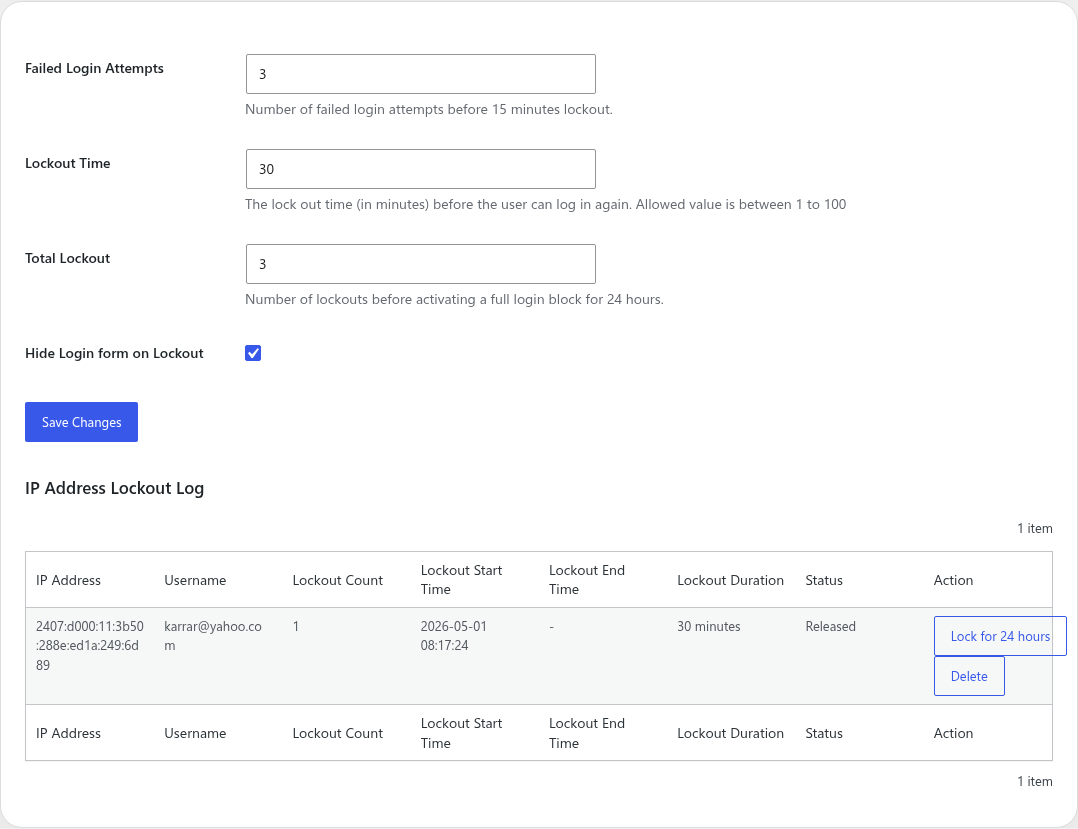
Setup Guide
- Go to Admin Optimizer > Security.
- Toggle the switch for Block Failed Login.
- Configure the number of allowed failed login attempts before a lockout is triggered.
- Allow 3 to 5 failed login attempts to accommodate minor typos, while blocking active brute-force bots.
- If using Pro, set the “Lockout Time” to 30 minutes.
- Save the settings.
What the user should test after setup
Attempt to log in with an incorrect password from an incognito window multiple times until the lockout is triggered.
Common mistakes or things to verify
Setting the threshold too low (like 1 attempt), locking out legitimate users on their first typo.
Verify it’s Working
After exceeding the failed attempts limit in a test window, verify that the IP is recorded in the IP Address Lockout Log.
Settings
- Failed Login Attempts: set how many failed attempts trigger a lockout. In the free edition, the lockout lasts 15 minutes.
- IP Address Lockout Log: view recorded lockouts from the settings screen.
Pro Features
- Lockout Time: customize the temporary lockout duration.
- Total Lockout: set the maximum number of times an IP can be temporarily locked out before receiving a full 24-hour block.
- Hide Login Form on Lockout: completely remove the login form for locked-out visitors.
Lockout Log
The settings screen includes an IP Address Lockout Log. Use it to review blocked IP addresses and understand whether lockouts are coming from real users, bots, or your own testing.
Free vs Pro
Free includes the failed-attempt threshold and lockout log. Pro adds custom lockout duration, full login block rules after repeated lockouts, and the option to hide the login form during lockout.
Notes
Be careful when testing failed logins on a live site so you do not lock out legitimate administrators.