Overview
Post Cloning duplicates posts, pages, and configured custom post types.
How It Works
Admin Optimizer adds clone actions to supported content lists. When used, it creates a separate editable copy of the original content.
When to Use It
Use it when you want to create a draft copy of existing content as a starting point for a new page or article.
Setup Guide
- Go to Admin Optimizer > Content & SEO.
- Toggle the switch for Post Cloning.
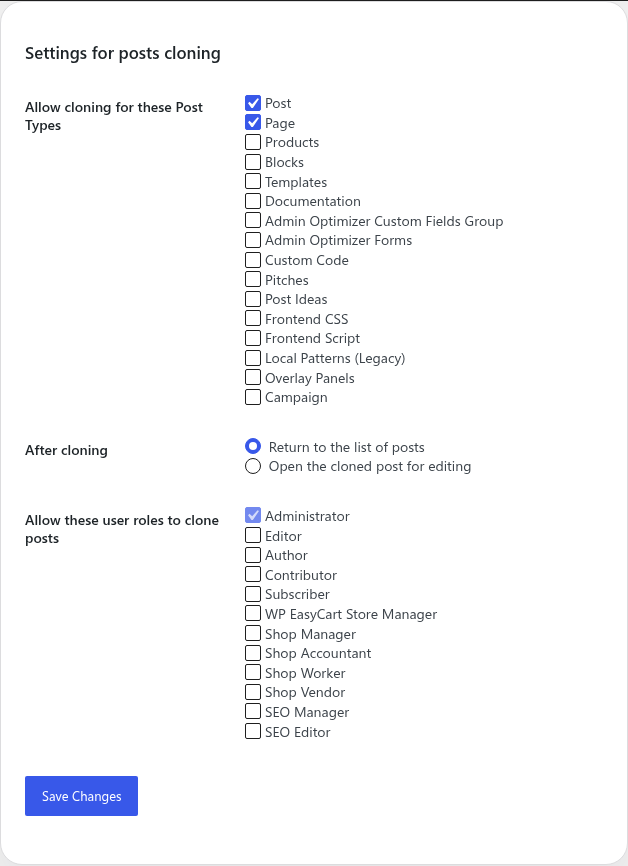
- Select which post types you want to enable cloning for (e.g., Posts, Pages).
- Choose the behavior for what happens after cloning (whether to return to the list or open the new draft).
Step-by-step setup example
- Enable the module and open the Post Cloning settings.
- Under Allow cloning for the following Post Types, check “Post” and “Page”.
- Under After cloning a post, select “Open the cloned post for editing”.
- Save the settings.
What the user should test after setup
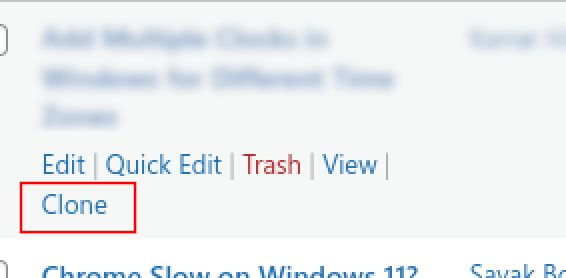
Navigate to Posts > All Posts (or your selected custom post type). Hover over an item and click the “Clone” action link. Verify that the post is duplicated as a draft and you are redirected according to your settings.
Common mistakes or things to verify
Forgetting to change the URL slug, title, or SEO metadata in the cloned post before publishing it. Always review the new copy to prevent duplicate content issues.
Verify it’s Working
Go to your chosen post type’s list table, hover over an item, and look for the “Clone” action link. Click it and ensure a draft copy is successfully created.
Settings
- Allow cloning for selected post types, including Posts, Pages, and available custom post types.
- Choose what happens after cloning: return to the list of posts or open the cloned post for editing.
- Pro lets you choose which user roles can clone posts.
Free vs Pro
Free includes post type selection and the after-cloning action. Pro adds role-based clone permissions.
Notes
Review cloned content before publishing, especially SEO metadata, slugs, and internal links.