Overview
Heartbeat Control adjusts or disables the WordPress Heartbeat API to reduce repeated background requests.
How It Works
Admin Optimizer applies the configured heartbeat behavior in the selected site areas and adjusts the heartbeat interval where supported.
When to Use It
Use it when admin pages, the block editor, or frontend activity create too many background requests for your hosting environment.
How to Enable
Go to Admin Optimizer > Performance and enable Heartbeat Control.
Settings
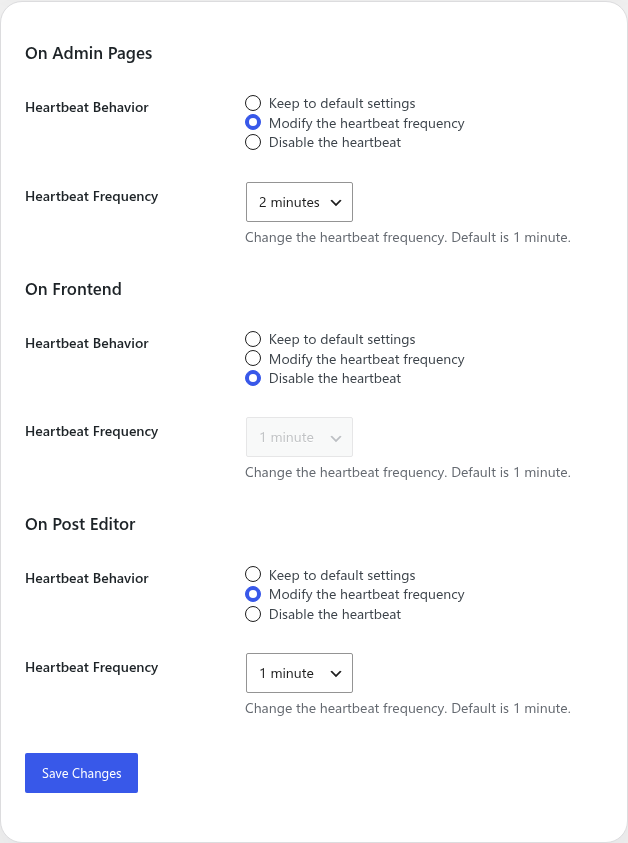
- Configure Heartbeat behavior separately for Admin Pages, Frontend, and Post Editor.
- For each area, choose Keep to default settings, Modify the heartbeat frequency, or Disable the heartbeat.
- When modifying the frequency, choose 15, 30, or 45 seconds, or 1, 2, 3, 4, or 5 minutes.
Notes
Disabling heartbeat can affect features that rely on background updates, such as editor autosave or session checks.