Overview
XML Sitemap customizes WordPress sitemap output and can add Google News sitemap features in Pro. Unlike other SEO plugins that create entirely separate sitemaps from scratch, this module leverages the native sitemap functionality built directly into WordPress Core. This approach ensures maximum compatibility and lightweight performance while giving you fine-grained control over what gets indexed.
How It Works
Admin Optimizer adjusts WordPress sitemap output based on the saved settings and can add sitemap links to robots.txt.
When to Use It
Use it when you want more control over sitemap inclusion, sitemap metadata, and robots.txt sitemap references without relying on a bulky third-party sitemap generator.

Setup Guide
- Go to Admin Optimizer > Content & SEO.
- Toggle the switch for XML Sitemap & Google News Sitemap.
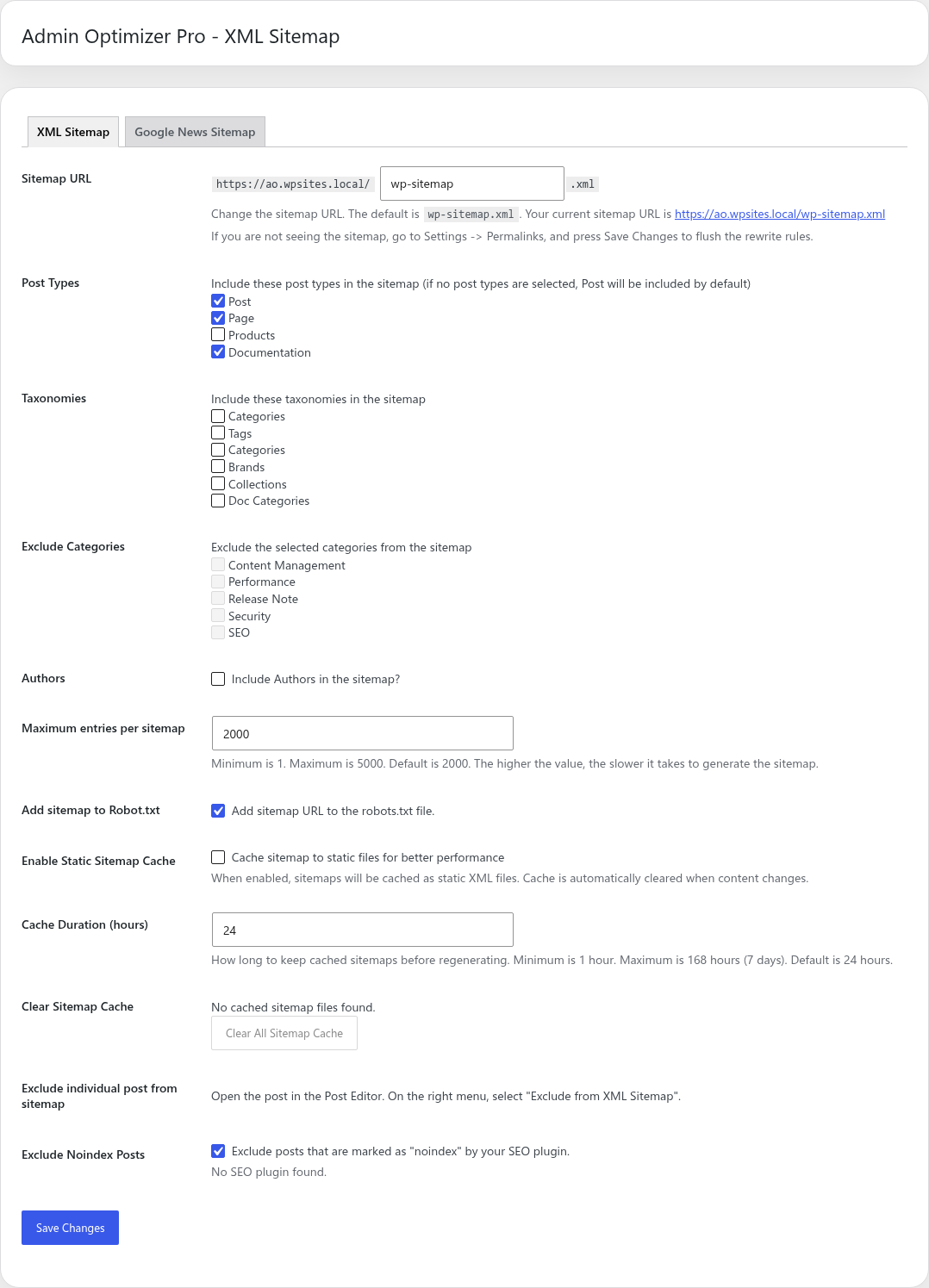
- Configure the Sitemap URL slug, post types, and taxonomies that should appear in the sitemap.
- We recommend keeping maximum entries at 2000, including Posts and Pages, and enabling “Add sitemap to Robot.txt”.
Step-by-step setup example
- Enable the module and open the XML Sitemap settings page.
- Set the Sitemap URL or keep the default slug.
- Select the post types and taxonomies you want to include in the sitemap.
- Exclude categories or tags that should not be indexed.
- Decide whether author archive URLs should be included.
- Check the box to “Add sitemap to Robot.txt”.
- Save the settings.
What the user should test after setup
Visit the generated sitemap URL to ensure it loads without errors and contains the expected links for your content.
Common mistakes or things to verify
Using a maximum entries value that is too high, which can cause slow generation or timeout errors. Forgetting to submit the sitemap URL to Google Search Console or Bing Webmaster Tools.
Verify it’s Working
Open your sitemap URL (e.g., /sitemap.xml) in a browser and verify that your public posts and pages are properly structured in the XML output.
Settings
- Sitemap URL: change the sitemap slug.
- Post Types and Taxonomies: choose what content appears in the sitemap.
- Exclude Categories and Exclude individual post from sitemap.
- Authors: include author archive URLs.
- Maximum entries per sitemap: choose 1 to 5000 entries, with 2000 as the default.
- Add sitemap to Robot.txt: add the sitemap URL to
robots.txt. - Pro adds noindex exclusions, static sitemap cache controls, and Google News Sitemap settings.
Static Sitemap Caching (Pro)
To ensure the fastest possible response times for search engine crawlers, the Pro version includes a Static Sitemap Cache feature.
How it works: Instead of generating the XML sitemap dynamically every time a bot requests it (which can consume server resources and slow down crawling on large sites), this feature pre-generates the sitemap and serves it as a static file.
Key benefits and behavior:
- Instant Response: Serving a static file is significantly faster than a dynamic PHP process, ensuring Googlebot and other crawlers can access your links efficiently.
- Automatic Regeneration: The cache is automatically cleared and rebuilt whenever you publish, update, or delete a post, page, or taxonomy term.
- Manual Control: You can manually clear the sitemap cache at any time using the “Clear Cache” button located in the XML Sitemap settings. This is useful if you have modified sitemap settings or made bulk database changes outside the standard editor.
Google News Sitemap
The Google News Sitemap is a Pro feature designed specifically for news publishers to submit their articles to Google News. Unlike the standard XML sitemap which includes all your evergreen content, the Google News sitemap has specific requirements enforced by Google to ensure timely news indexing.
How it works and key features:
- 48-Hour Window: The News sitemap automatically only includes articles published within the last 48 hours. Older articles are dropped from this specific sitemap (though they remain in your standard XML sitemap).
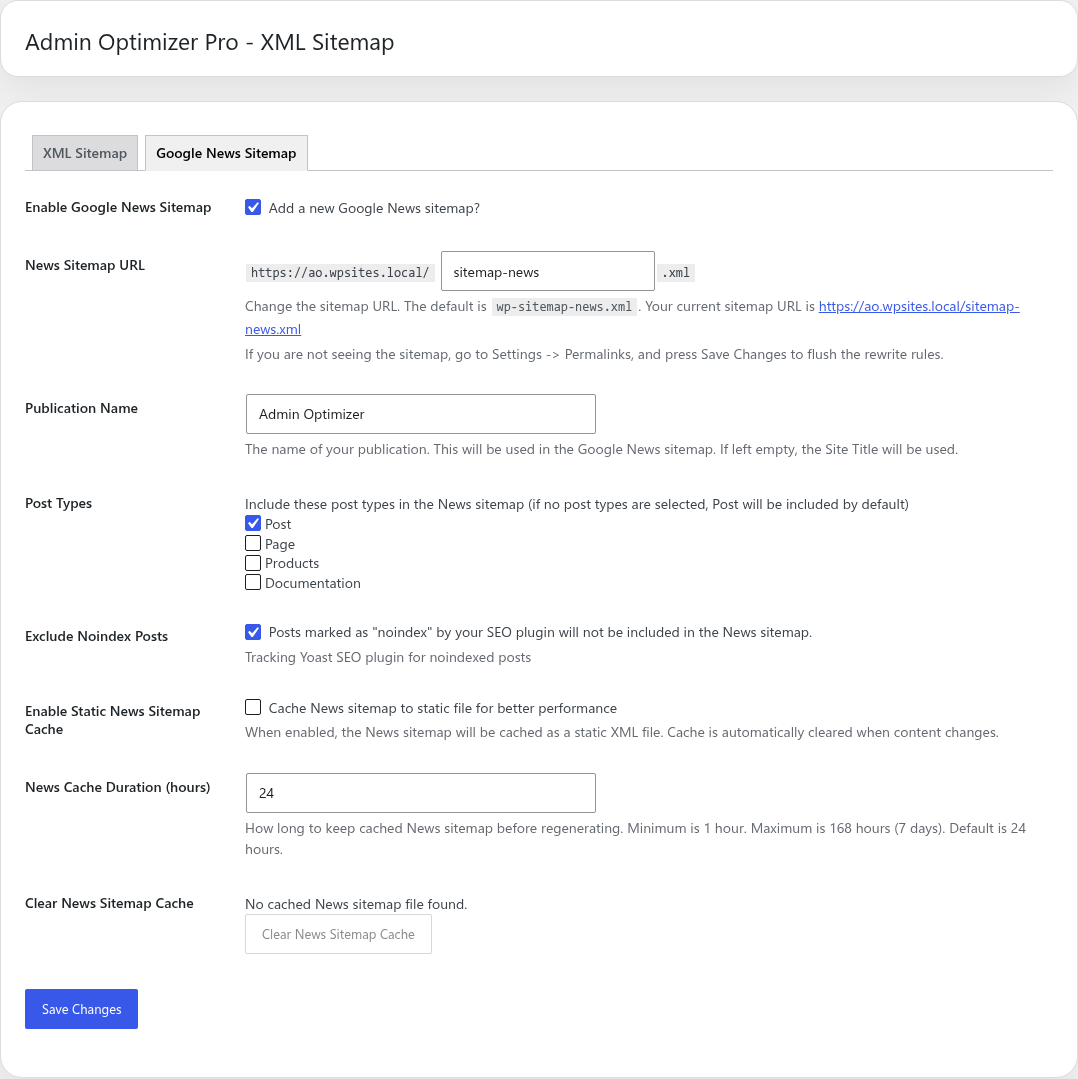
- Publication Name: You can configure the exact publication name that matches your Google News Publisher Center profile.
- Dedicated Sitemap URL: It creates a separate endpoint specifically for submission to the Publisher Center.
- Content Selection: You can specify exactly which post types should be treated as news (usually only “Posts” or a custom “News” post type).
- Static Caching: Since news requires fast crawling, the static cache feature pre-generates the sitemap to ensure instant response times for Googlebot.
Configuration steps:
- Switch to the Google News Sitemap tab in the XML Sitemap settings.
- Ensure your Publication Name exactly matches your Google News Publisher Center name.
- Select the post types that contain your news articles.
- Save the settings, and submit the generated News Sitemap URL to Google Search Console or Publisher Center.
Noindex & SEO Plugin Tracking (Pro)
The Pro version of the XML Sitemap module automatically excludes posts from the sitemap if they are marked as “noindex”.
How it tracks existing SEO plugins: Instead of requiring you to manually re-configure all your exclusions, this module can track the noindex metadata set by popular third-party SEO plugins. When generating the sitemap, the module dynamically modifies the database query to exclude posts that have been hidden from search engines by:
- Yoast SEO (checks
_yoast_wpseo_meta-robots-noindex) - Rank Math (checks
rank_math_robotsfornoindex) - All in One SEO / AIOSEO (queries the custom
aioseo_postsdatabase table) - The SEO Framework (checks
_genesis_noindex) - SEOPress, Slim SEO, and SmartCrawl (checks their respective custom post meta fields)
If you have a supported SEO plugin active, the module will respect those existing noindex rules so you don’t end up accidentally indexing private pages. The module also provides its own “Exclude from Sitemap” checkbox on individual posts if you aren’t using another SEO plugin.
Free vs Pro
Free includes XML sitemap controls. Pro adds noindex exclusions, static sitemap caching, and Google News sitemap support.
Notes
- After changing sitemap settings, always check the generated sitemap URLs to ensure they are accurate.
- Migrating from another plugin: If you are switching from another SEO or sitemap plugin (like Yoast, Rank Math, or Google XML Sitemaps), you must disable the sitemap feature in that plugin to prevent duplicate sitemaps or conflicts. Additionally, since your new sitemap URL might be different (e.g., changing from
/sitemap_index.xmlto/sitemap.xml), be sure to submit the new URL to Google Search Console and remove the old entry.