Overview
Custom Post Status lets you create and manage additional post statuses.
How It Works
Admin Optimizer registers saved custom statuses and makes them available in supported admin editing workflows.
When to Use It
Use it when your editorial workflow needs statuses beyond Draft, Pending Review, and Published.
How to Enable
Go to Admin Optimizer > Custom Fields & Types and enable Custom Post Status.
Setup Guide
- Go to Admin Optimizer > Custom Fields & Types.
- Toggle the switch for Custom Post Status.
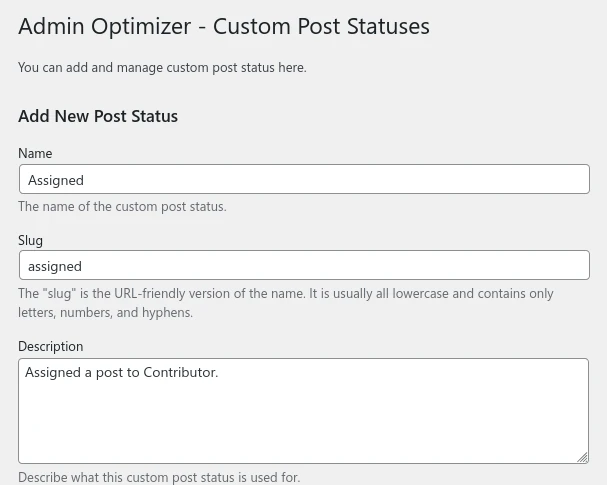
- Set the status name, slug, and optionally its description.
- Recommended default configuration
Use clear names like “Needs Review” and restrict to necessary post types if using the Pro version.
Step-by-step setup example
- Open Custom Fields & Types > Custom Post Status.
- Add a new status with a descriptive name.
- Enter a slug or leave blank to auto-generate.
- Add a description.
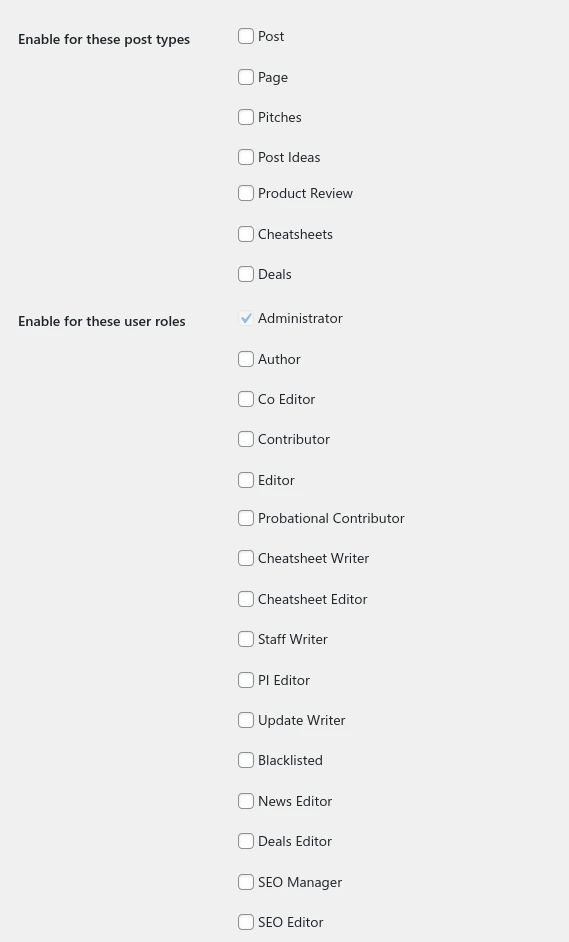
- In Pro, choose which post types and user roles can use it.
- Save the status.
What the user should test after setup
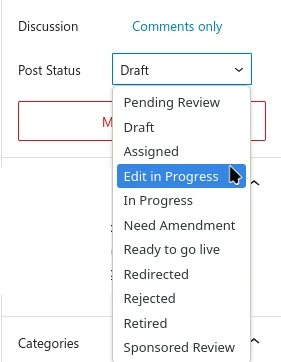
Create or edit a post and check if the new custom status is available in the publish options.
Common mistakes or things to verify
Using a slug that conflicts with default WordPress statuses (e.g., publish, draft).
Verify it’s Working
In the post editor, click the Status dropdown. Your new custom status should be listed as an option.
Settings
- Name: the display name for the custom status.
- Slug: the saved identifier for the status. If left blank, it is generated from the name.
- Description: a note explaining how the status should be used.
- Pro adds post type targeting and user role targeting. Administrators are always included for role access.
Workflow Tips
Use names that describe an editorial state, such as Needs Review, Legal Review, or Ready for Design. Avoid creating statuses that duplicate WordPress defaults unless the workflow needs a separate meaning.
Free vs Pro
Free supports creating and managing custom statuses. Pro adds controls for which post types and user roles can use each status.
Notes
Custom statuses can affect editorial workflows, list views, and publishing behavior. Test with your roles before relying on them.